PiSugar 2; a Raspberry Pi UPS that has left me a little bitter
A UPS for your Raspberry Pi, but, won't turn your Pi on? What?

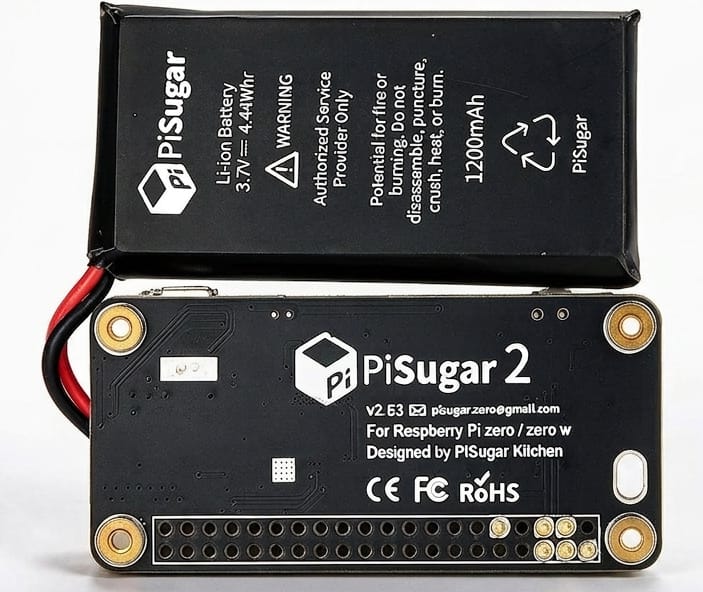
TLDR; If you need a basic UPS for your Pi, one that can just let your Pi power off safely, the PiSugar 2 will do that. If you require the Pi to automatically come back on when power is restored, you need the PiSugar 3.
I have a Raspberry Pi 0 W in my car with a cheap USB GPS that tracks my location, stores it in CSV files, and uploads it to my server when it gets on Wi-Fi. It's not really intended for theft tracking or anything like that, as it does require my Wi-Fi to upload data, but I like doing this so I can look back at places I've been, etc. Some day I'll write up something more about the setup and put the code up on GitLab, although it's pretty specific to me and probably not super useful to anyone else. But with adaptation, one could change it to make different calls and upload into different places, perhaps use Darawich instead, or even add a cellular modem for real time tracking, etc.
I've had this set up for years, and it works pretty reliably, but I'm ashamed to admit that for all that time, the poor Pi just gets rudely powered off when the car turns off. I have it writing to disk as little as possible, but this is still pretty bad to do. I think I occasionally have a fsck on power up as the tracking either never starts, or starts super late, so, I wanted to fix all that.
A few years ago I looked for a UPS solution for a Pi that would of course power the Pi for at least enough time for it to cleanly shut down, so the Pi would have to know when power is lost. It also has to power the Pi on when power is restored. Given this is tracking my car, I really only want it doing that while the car is in operation, so running 24/7 is just adding wear and tear and lots of GPS data of my car sitting in my garage. At the time I didn't find anything that wasn't really just a portable battery; they didn't talk to the Pi, didn't cut power to the Pi when power is lost, turn the Pi back on when power is resumed, etc. Just recently I looked again, and now I am seeing the PiSugar modules, which either I didn't notice before or the older models did not support the things I needed.
PiSugar 2 Saga
After (apparently not enough) reading, I decided the PiSugar 2 would be the right tool for the job. I got it, attached it, installed the software, vibe coded a script to monitor the PiSugar status and cleanly shut down when it loses power for more than N minutes, etc. It was all working great, until I actually tested it completely. Once the Pi, and the PiSugar, lost power, the Pi would power down cleanly, as would the PiSugar. Great! Plug the PiSugar back in.... nothing.
I initially thought somehow it was bricked, as it seemed to not be doing anything at all. After much googling, and then reading the PiSugar docs site more, I finally saw it. PiSugar 2 feature; Automatic power on when external power is restored. Two independent power supplies are required. So you have to plug in both the Pi and the PiSugar. What? After much more digging and testing, I can confirm that the PiSugar 2 will NOT automatically power on a Pi on when its own power is restored unless you power both the Pi and the PiSugar.
They mention the fact that you have to have two independent power connections (one to the Pi and one to the PiSugar) in a few places, but IMO not strongly enough. It doesn't make any sense why this is required. What's even more bizarre is that you apparently CAN set it to wake up at a set time just fine. So the PiSugar can turn on the Pi. Just, not at power restoration time? I don't understand this bizarre limitation. And no, it's not a "it can turn it on soon after" or there is some setting incorrect, it just simply can't do it. The only way the Pi will turn on with power restoration with a PiSugar 2 is for the Pi to itself also be directly powered.
Okay, weird, but, sure, we'll do that. Plug power into the Pi and the PiSugar, I can get a dual port 12V USB adapter, or use a 12V Y cable, etc, no biggie. Tested that this all works, and it does, until I realized a massive issue. The Pi will back feed the PiSugar if not powered from COMPLETELY isolated power supplies. Your average dual port 12V power adapter will back feed, as internally everything is connected together. Even if you use separate 12V USB power supplies, the 12V adapters will STILL back feed across through the 12V side! What this means is that when power is lost, the PiSugar thinks there's still power because the Pi itself is feeding it 5V now. So it'll never detect a power off, thus, can not shut down cleanly. The only way it'd work is if you had completely isolated 12V->5V power supplies powering each device. Unfortunately every 12V->5V car adapter I have here, including some name brand ones, don't seem to have any isolation within themselves. And hacking up something to isolate them didn't seem sane to me, and there's really no such thing as a USB cable or even intermediate dongle that has a diode in it to block back feeding as that would also drop the supply voltage.
So I returned the PiSugar 2 and got a PiSugar 3, because that model claims direct support to power on the Pi with only a single power cable plugged into the PiSugar 3 itself. I really hope this is true, because if it's not, I guess I'll be returning it too. Otherwise, I'll update this post, or maybe a separate post entirely. I think this is a cool project, and hope it'll work for me, but it just has some weird quirks.
PiSugar 3; the solution?
After setting up scripts and learning how the PiSugar 2 worked, but finding out it did not do what it says it will do (automatically power the Pi up when power is restored) in a sane way, I returned the PiSugar 2 and purchased the PiSugar 3 instead. It was a bit more expensive, but the good news is that all of my scripts and things I'd learned along the way were effectively the same on the PiSugar 3. In other words; I didn't have to change anything. My scripts work, and, finally, the Pi powers back up automatically when the PiSugar 3 receives power again. The only thing I haven't managed to make work yet, and I'm 99% sure this is on the Pi side, not the PiSugar side, is reading the RTC from the kernel at boot time before the system starts. I can read the RTC after the system starts, and the clock syncs from it, that's all fine and is working well (after some twiddling on Pi scripts) but that's happening 20-24 seconds into boot rather than immediately at boot. Again, I suspect this is Pi side, and the I2C isn't becoming available until well into the boot process. It's very possible this is a limitation of the ancient Stretch (Debian 9) install I have on this Pi. Keep in mind, this Pi never touches the internet, it only sends data to a server on my LAN, so besides having to deal with old crusty archive links etc, this isn't a big deal. If I ever rebuild the OS, perhaps upgrade to a Pi Zero 2, this might work better.
As long as I don't find any weird quirks from here out, it seems like the PiSugar 3 is going to work well for me. I just hope the battery doesn't give me issues long-term, but I have a feeling it'll likely be fine since the PiSugar 3 actually limits charging when it is set to, unlike the PiSugar 2. It hovered around 80% the entire time I was doing testing, which is perfect.
Bonus Jank
Also, super fun, is that they say they support the original Pi Zero, but you have to manually install an old buggy version of it to work at all. Anything newer than version 2.2.1 is compiled for ARMv7 and just immediately crashes on an original Pi Zero which is ARMv6. This GitHub issue describes what's going on: https://github.com/PiSugar/pisugar-power-manager-rs/issues/134
Basically, you just need to specify the version when installing the power manager, and 2.2.1 is the last known one that works:
bash pisugar-power-manager.sh -c release -v 2.2.1
Maybe if the PiSugar folks get around to it, they could have their installer script install a separate ARMv6 build they could make, but so far, they haven't responded to the issue about this at all.
What's buggy? Well, for one, every HTTP, TCP, or Socket connection to the server creates a new file handle, so if you have a script querying battery voltage, battery percent, if power is plugged in, etc, every 3 seconds so it can cleanly power off the Pi once power is lost, this means that it's creating 9+ new file handles every 10 seconds. Eventually the server runs out of file handles and either crashes or just simply stops responding. I worked around this issue in my scripts and also extended the number of file handles the server is allowed, but it's still pretty wild that this is an issue. It may be fixed in newer versions, but since I can't use them I can't test that. There are also features in the PiSugar docs that simply don't work on the older server versions, such as the HTTP API, and a few commands. They just assume you're going to use the latest version; which I would, if I could!
Just to be clear; PiSugar 2 or PiSugar 3, doesn't matter. The software is common between the two, so the buggy old software issue is still an issue for me, although at least I worked around the file handle issue and probably won't have any problems in normal usage.
Update; ARMv7 requirement fixed
I have not tested this, maybe I will some day, but since this is in my car and is working quite well (on the PiSugar 3) I am not going to mess with this immediately. But hopefully it's fixed, and no more workaround needed for the Pi Zero W.
Summary
I'd avoid the PiSugar 2 altogether and get a PiSugar 3 instead. I realize my usage is somewhat niche, but it's also really not. How many Pi's are out there doing important things that are set up in ways that the folks depending on them never have to directly interact with the Pi. They want it to just-work, but also survive power outages and cleanly shut down. They aren't going to go power the Pi back up manually (which apparently you can do by shorting some GPIO pins) and I'm not going either, it lives under the floor of the trunk of my car and until I messed with this PiSugar 2, I hadn't physically seen it for years.
Now that I'm using a PiSugar 3 and things are working the way I expect, I probably will take a little time to do some more cleanup on my scripts. I'll put the scripts, setup description, etc. in a GitLab repo, and do a write-up on the overall system.
However, the PiSugar 2 left quite a bitter taste in my mouth.